Stop typing.
Start talking. — Voice dictation and meeting recorder for Windows.

Voice dictation and meeting transcription for Windows. Push a key, speak, release — the text lands at your cursor. Record any meeting and a clean AI summary is one click away.

Windows 10 & 11 · 14-day free trial · no credit card

Your brain runs faster than your fingers.

The long email you already drafted in your head before opening Outlook. The meeting where you'd rather pay attention than scribble notes. The ChatGPT prompt you cut to keywords because typing the full thing felt like too much effort. There's a pile of typing in your week you'd rather just skip.

You sit through an hour of conversation, scribbling fragments between speaking turns, and afterwards you stare at a half-page of cryptic bullet points wondering what that one "important follow-up" was about. Next meeting starts in five minutes. Typing while listening means you do both poorly.

There's a simpler way. Just talk.

WinTranscribe records what was said and turns it into clean text. A quick reply you dictate while walking, a whole meeting you recorded in the background. Every word is there, every action item is there, and you got to actually pay attention while it was happening.

Dictate into anything

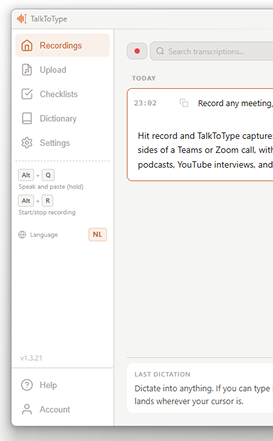
If you can type into it, you can talk into it. Hold a key, speak, release, and the text lands wherever your cursor is. Works the same in your inbox, in ChatGPT, in Slack, in the search bar of your browser.

ChatGPT
Claude
Gemini
Perplexity
Copilot
Mistral
Cursor
Google Docs
Word
OneNote
Notion
Obsidian
Evernote
Medium
Gmail
Outlook
LinkedIn
X / Twitter
WhatsApp
Telegram
Signal
Slack
Discord
VS Code
GitHub
Jira
Figma
Canva
+ any text field

Record any meeting, no bot needed

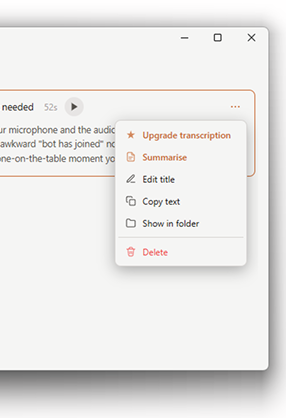
Hit record and WinTranscribe captures both your microphone and the audio from your speakers. So you get both sides of a Teams or Zoom call, without an awkward "bot has joined" notification. Same trick works for podcasts, YouTube interviews, and the dictaphone-on-the-table moment you forgot to plan for.

Recording happens on your own computer with your own microphone and speakers, like any local recording app. You're responsible for telling participants you're recording where local law requires it (the EU does, most US states do).

Microsoft Teams
Zoom
Google Meet
Webex
Skype
GoToMeeting
Slack Huddles
Discord calls
WhatsApp calls
YouTube
Twitch
Spotify
Podcasts
VLC
+ anything that plays audio

Built for people whose job is mostly talking

If your calendar is back-to-back calls or your inbox never empties, the time you'll save here adds up faster than you'd expect.

Recruiters

Intake calls and interviews recorded automatically. After hanging up the transcript and summary are already waiting, ready to share with the hiring manager. No more typing up notes between back-to-back calls.

Consultants

Every client requirement captured the moment it's said. Use a checklist so the AI tells you when a question hasn't come up yet. You leave the call with action items, not a half-page of cryptic shorthand.

Managers

Lead the conversation, don't transcribe it. The full transcript and summary are ready by the time you walk out of the room, so you can confidently assign follow-ups instead of guessing what was decided.

Customer support

Dictate the ticket note straight after the call ends, while it's still fresh. Record escalations so your team can listen back to the exact words instead of playing telephone.

Sales

Discovery calls get summarised into prospect needs you can actually paste into your CRM. Dictate the follow-up email between meetings, instead of typing it at midnight.

Anyone in meetings

If you talk for a living, you're typing too much. Let the keyboard do less and reclaim a couple of hours a week.

What it actually does

Dictate into anything

Hold a key, speak, release. The text appears wherever your cursor is, in any app: Outlook, Slack, Word, Teams chat, the search bar of your browser. The under-appreciated bonus: people give way better prompts to ChatGPT when they speak than when they type. You'll find yourself explaining the actual problem instead of stripping it down to seven keywords.

Record a meeting, no bot needed

WinTranscribe grabs both your microphone and the audio coming from your speakers. So both sides of a Teams or Zoom call land in the same recording, without an awkward "bot has joined" notification. Same trick for Google Meet, Webex, any platform, even YouTube. The transcript scrolls live as the conversation happens, in 30-second chunks. When you stop you have an MP3 and a clean text file.

Live checklists during meetings

For the conversations where you really don't want to forget to ask something. Sales call, job interview, intake, doctor's appointment. Make a list of the points beforehand, activate it, hit record. The AI watches the transcript live and ticks them off as they come up. You walk out knowing you covered everything.

Five languages, one hotkey

Need to send a message to a Dutch colleague straight after dictating one to a French client? Press one key and the next dictation comes out in the other language. Works for Dutch, English, German, French, and Spanish. Add tricky names or jargon to your personal dictionary and the AI will spell them right every time.

Got old recordings? Drop them in.

That folder of voice memos, interview WAVs, meeting MP3s you keep meaning to listen back to? Drag them into WinTranscribe and you get the same transcript and AI summary as a live recording. Catching up on a missed meeting takes minutes instead of an afternoon.

A premium pass for the ones that matter

Live transcription is fast and good enough for most calls. For the meeting you actually need to keep clean, click "Upgrade transcript" and a heavier AI model goes back over the audio. Handles accents, technical jargon and overlapping speakers far better, and adds speaker labels plus timestamps so you can search back to a specific moment. You decide which recordings deserve it. No need to pay for all of them.

No bots. No "X has joined the call".

Most meeting transcribers send their own bot into your call. Useful on paper, annoying in practice. WinTranscribe records from your own computer — no bot, no extra participant in the meeting.

Meeting bots (Otter, Fireflies, ...) WinTranscribe
Visible as a bot in the call? Yes -- "Bot joined" notification No -- no bot, no extra participant
Where do your recordings live? On their servers, forever On your computer only
Works with every platform? Only supported apps Any app that plays audio
Live meeting checklist? No Yes -- auto-ticks talking points as they’re discussed
Recurring cost? $16-30/month From €49 one-time

You switch languages all day? It keeps up.

Dictate the Dutch message to your colleague, press one key, dictate the English reply to a client. Five languages live behind one hotkey: Dutch, English, German, French, Spanish. No setting screens to dig through, no menus, just a tap on F8.

Add tricky names, brand terms, and jargon to your dictionary once and they'll be spelled right across every language from then on.

The small stuff that adds up

Tiny details, but the ones you'd miss if they weren't there.

Re-paste your last dictation

Closed the wrong window or pasted in the wrong field? Win + Esc drops the same text again, wherever your cursor is now.

Click a line, hear it back

Click any line in the transcript and the audio jumps to that exact second. Useful when you swore someone said "Tuesday" but the notes say "Thursday".

Teach it your weird words

Add colleague names, brand terms, technical jargon to your dictionary. No more "John" when you mean "Johan", or "Vertex" when you mean your product "Verteks".

Pick your own hotkeys

Don't like the defaults? Remap any shortcut. The app won't hijack the keys you already use for something else.

Paste with formatting intact

Summaries paste into email or Word with bold, headings and bullet lists kept. No more cleaning up asterisks by hand.

Search across everything

Full-text search through every recording. Pin the session you're working on, star the ones you want to keep finding back.

Three minutes from install to first transcript

No setup screen marathon. No API keys to figure out. Download, click, talk.

Install

A small installer that takes under a minute. Windows 10 and 11.

Open it

Pick your language and you're in. The 14-day trial starts automatically, no card needed, no settings to wrestle with.

Talk

Press Alt+Q and the words you speak land at your cursor. Hit record on a meeting for a live transcript.

It's yours

Every recording becomes an MP3 plus a clean text file on your own computer. Drop them in Notion, Obsidian, your file manager, your inbox. Wherever you want.

Want full control? The Lifetime License lets you use your own free Groq account (not to be confused with Elon Musk's Grok). Then nothing about your audio touches our servers at all.

We don't keep your recordings. Anywhere.

Your audio files live on your own computer. We don't back them up, don't analyse them, and they never sit on a server of ours. There's no "WinTranscribe account" you sign up for. We literally don't have a place to keep your stuff.

The transcription itself runs at a speech-to-text provider (Groq by default, not to be confused with Elon Musk's Grok). Audio is sent there briefly to be turned into text, then thrown away.

No telemetry on what you say. No analytics on your transcripts. No data we could sell because we never collected it.

Pick a plan

All paid plans include every feature and a 14-day free trial. No credit card required to start.

Feature
Free
€0
forever
Starter
€9.95
per month
Most complete
Pro
€25
per month
License
€49
one-time
Bring your own AI key. Pay once.
Inline Dictation 5 min/day Unlimited Unlimited Unlimited
Record & transcribe meetings
Upload audio files
Live checklist during meetings
AI summary
Email summary delivery
Premium transcript upgrade 1200 min/mo your own key
Premium AI summary your own key
Use your own Groq / OpenAI / Google account
Lifetime, no subscription

Every plan starts with a 14-day free trial — every feature included, no credit card needed. You only pick a plan if you decide to keep going.

Frequently asked questions

Is my audio private?

Your audio files stay on your own computer. We don't back them up, we don't analyse them, we don't have a server they sit on.

For the transcription itself the audio is briefly sent to a speech-to-text provider (Groq by default, not to be confused with Elon Musk's Grok). The provider converts it to text and discards it. With the Lifetime License you use your own free Groq account, so even that step doesn't pass through us.

Can I try before I buy?

Yes, 14 days, every feature included, no card needed. Download, install, click start. The clock only starts when you launch the app for the first time.

What's the difference between the plans?

Lifetime License (€49 one-time): pay once, no monthly fee. You make a free Groq account (one minute), paste the key into the app, done. Groq is free for normal use so most people never pay them anything either. Power users can swap Groq for OpenAI or Google.

Starter (€9.95/mo): everything managed, no accounts to set up. Unlimited live transcription, dictation, summaries, and meeting recording. Premium transcript upgrades are a Pro-only feature.

Pro (€25/mo): for heavy users and small teams. 1200 premium minutes a month, plus priority support.

All paid plans start with a 14-day free trial.

What is WinTranscribe actually?

A Windows app that does two things really well. One: you hold a key, speak, and the text shows up wherever your cursor is. Two: you press record before a meeting and afterwards you have a transcript, an AI summary, and (optionally) a checklist that ticked off your talking points as they came up.

How does dictation work in practice?

Hold the hotkey, speak, release. The text appears at your cursor. Doesn't matter if you're in Outlook, ChatGPT, Slack, a Word document or the search bar of your browser. If you can type into it, you can talk into it.

Does it work with Teams, Zoom, Google Meet?

Yes, and any other platform too. WinTranscribe isn't a bot that joins your call. It records what comes out of your speakers and what goes into your microphone, on your own machine. So you get both sides of the conversation, no one sees a "bot has joined" notification, and you don't have to give some third-party company access to your meetings.

Which languages does it handle?

Dutch, English, German, French, Spanish. One hotkey to switch. Dictate something in Dutch to a colleague, press F8, dictate the next thing in English to a client.

What is a "premium transcript" and when do I need one?

Live transcription runs while you record, using a fast model. It's accurate enough for almost everything you'll do day-to-day.

For the recordings that really matter (important meetings, interviews, calls with heavy accents or jargon) you can click "Upgrade transcript" and a heavier AI model goes back over the audio. It handles long multi-speaker recordings better, sorts out who said what, and catches the bits the faster model misses.

Premium upgrades are a Pro-only feature (1200 minutes a month). Starter and Lifetime License users see the same "Upgrade transcript" button but on Starter it'll suggest upgrading to Pro, and on Lifetime License it routes to your own Google AI account. Live transcription and dictation are unlimited on every paid plan.

Can I drop in an old recording?

Yes. Drag any MP3, WAV, M4A or OGG into the app and you get the same transcript and AI summary as a live recording. Useful for that pile of voice memos you keep meaning to listen back to, or for catching up on a meeting you missed.

Why is speaking to ChatGPT better than typing?

When you talk you give context. When you type you cut corners. People who dictate their prompts naturally explain what they actually need ("I'm writing a follow-up email to a client who didn't reply, here's the original thread, keep it warm but firm") instead of stripping it to keywords ("follow up email firm but polite"). The AI gives you better answers because you gave it a better question. And it took less time to ask.

What are these "live checklists"?

A list of points you don't want to forget to ask. You build it once (sales call template, intake form, interview agenda), activate it before you hit record, and the AI watches the transcript live. Points get ticked off as they come up. You walk out knowing you covered everything.

Stop scribbling. Start listening.

Fourteen days free, no card needed. If it doesn't save you time, just close the app and move on.

Get it from Microsoft Store

Windows 10 & 11 · updates via Microsoft Store